
What's New in Colombia Move Housing: Maps, Filters, and Neighborhood Insights
A big upgrade to our housing marketplace: every listing now has an Explore the Area map with transit and walk-times, neighborhood character cards, and a universal price filter that toggles between COP and USD.

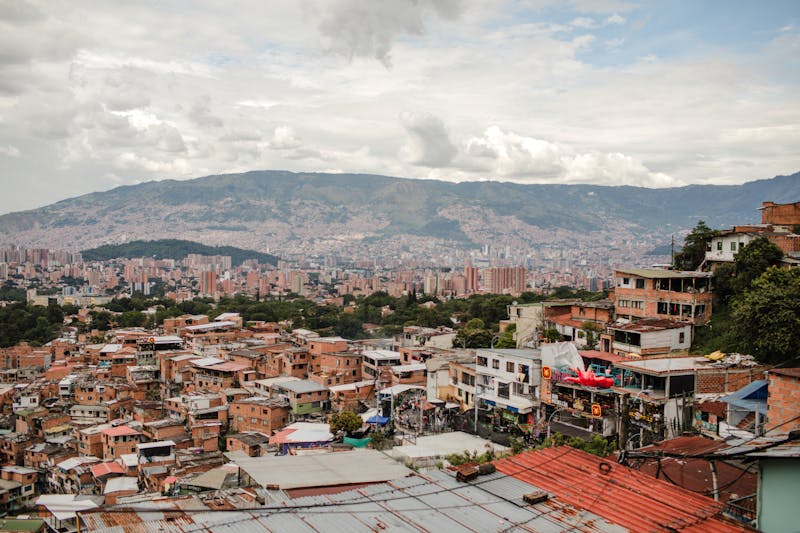
Finding an apartment in Colombia used to mean piecing together three Facebook groups, a WhatsApp chain, and the occasional Finca Raíz tab that kept refreshing ads for places already rented last month. We just shipped the biggest housing-search upgrade this site has ever had, and I want to walk through what changed, why it changed, and how to actually use it if you're looking for a place in Medellín, Bogotá, Cartagena, Cali, or anywhere else we cover.
None of this costs anything. Posting is still free. Browsing is still free. You don't need an account to search, and you don't need one to see a neighborhood's character or average prices either. The point of the upgrade is to give buyers and renters enough context before they click — and to give sellers and landlords a reason to fill out their listings properly, because the filters now genuinely route motivated buyers to the right place.
Here's a tour of what's new, grouped by where you'll run into each feature.
Explore the Area on every listing
Open any housing listing and scroll down. There's now a section called Explore the Area with an interactive map of the listing's neighborhood. We use CartoDB Positron tiles through Leaflet, so it renders fast on mobile and doesn't need a Google API key.
A few things show up on that map without you doing anything:
- A soft circle around the neighborhood so you can see how central (or not) the listing is within its area.
- Pins for other active listings in the same neighborhood, jittered slightly so overlapping addresses don't stack.
- The closest metro, cable, or tram station with an estimated walking time (Medellín, Bogotá TransMilenio, and Cartagena's Transcaribe are wired up).
- Points of interest nearby — supermarkets, parks, hospitals and clinics, coworking, gyms, and schools — with walking-time estimates.
I personally care most about the walk time to a supermarket and the closest metro stop. If you're a digital nomad, the coworking layer will be your thing. If you have kids, the schools layer is probably why you opened the listing. The idea is that you can judge how livable a specific address is without getting on Google Maps in another tab.
Exact coordinates are never exposed. Only the neighborhood circle and jittered pins show — we do this on purpose to protect sellers while you're still browsing. Once you message the owner and they share the address, you can plug it into whatever map you want.
Neighborhood character cards (the part I'm proudest of)
We now have curated editorial descriptions for 40+ neighborhoods across Medellín, Bogotá, Cartagena, Cali, and Santa Marta. Laureles reads like Laureles. El Poblado reads like El Poblado. Chapinero reads like Chapinero. Not a template with the name swapped in — each one talks about what the streets actually feel like, what you'll eat there, who lives there, and what the trade-offs are.
These cards show up in three places: on the listing detail page when the listing has a neighborhood, on the /ciudad/{city}/{neighborhood} pages, and (for listings where only a city was picked) a city-level editorial fallback still runs so the area context isn't empty.
Want to see one in action? Here's our full guide to living in Laureles — which reads like the long-form version of what the neighborhood card on the site hints at.
A price filter that toggles between COP and USD
The price filter has always been on /buscar. Two things changed:
First, it used to only appear when you picked a housing category. If you were searching for a used laptop, a scooter, or a dining table, there was no way to say "under 2 million pesos." That was embarrassing, honestly. It's now universal — whatever you're filtering on, the price range is right there.
Second, there's a COP/USD toggle next to the min/max inputs. If you think in dollars — most expats do, especially when comparing rents against what they paid in their home country — flip it to USD, type 600 and 1200, and the server converts to COP at the live rate before querying. We cache the FX rate for an hour so performance stays snappy and the upstream provider doesn't get hammered.
The filter also lives on the homepage: the left sidebar on desktop and the Filtros sheet on mobile. So you can narrow by price before even hitting the full search page.
Average rent and sale prices per neighborhood
Each /ciudad/{city}/{neighborhood} page now shows average active prices for apartments, houses, and rooms — broken out by rent vs sale — and we show the COP figure alongside a USD estimate so both sides of the audience can sanity-check against what they already know.
The numbers come straight from the active listings on the site at the moment the page loads, which means they move as inventory moves. It's not a quarterly report from a real-estate board. It's what sellers are asking for today. If you want a deeper breakdown by specific neighborhoods, we also wrote up average rent in Medellín and average rent in Bogotá as dedicated articles with more context.
Who this actually helps
Expats moving to Colombia
You've never been to El Poblado. You don't know what Manila means versus Provenza versus Astorga. The character cards and POI layer are built for exactly that gap — so you can read about the neighborhood before you waste a weekend driving around looking at buildings. Pair it with our estrato guide and the map actually starts to tell a story.
Colombians posting their apartments
Filters are a two-way mirror. If you fill in the neighborhood, bathrooms, stratum, and amenities when you post, you'll show up when someone filters "estrato 5 with pool and parking in Envigado." If you skip those fields, you're invisible to that query. The upside of the new universal price filter is that price-sensitive buyers will now also find your listing specifically at their price — they won't just bounce off the category landing page.
Digital nomads and remote workers
The coworking layer is yours. Toggle it on the map, see which neighborhoods have a coworking within a 10-minute walk, and cross-check with the gym layer if you're picky about it. I use this myself when I'm re-evaluating where to live every few months.
Long-term investors and landlords
Average sale prices per neighborhood plus the historical sold/pending inventory layer we shipped earlier is starting to look a lot like a proper MLS. We're not there yet — the data needs more volume before the sold comps are authoritative — but the plumbing is in place.
A quick note on privacy
Everything on the map is intentionally neighborhood-level. No exact pins. No street addresses shown in search results. Listings display the neighborhood label and nothing more until the seller chooses to share details with a specific buyer via message. Sellers asked us for this specifically — the old "drop a pin anywhere in the city" UX on other sites has been exploited for everything from casual stalking to setting up specific-address scams. We avoided it on purpose.
If you're a seller and you want to share the exact address in a listing description, you're obviously free to — we don't strip that. We just don't compel you to.
🏠 Try the new housing search
Interactive map, neighborhood character cards, universal price filter — free to use, no account required.
Browse housing →Frequently asked questions
❓ Does any of this cost money?
No. Posting is free. Browsing is free. The map, the character cards, the price filter, and the neighborhood averages are all free for everyone. The only paid things on the platform are optional promotion boosts for sellers (urgent badges, featured slots) — those don't affect the new search UX.
❓ I'm posting a listing. Do I have to pick a neighborhood?
You don't have to — picking just a city still works. But if you do pick a neighborhood from the dropdown, your listing shows up in every neighborhood-level filter and gets the character card plus map treatment on the detail page. It's a two-minute upgrade and it moves listings noticeably.
❓ My neighborhood isn't in your character cards. What happens?
The site falls back to a city-level editorial card so the page doesn't feel empty. We're adding neighborhood-specific entries in batches as we get good data. If there's a specific barrio you'd like us to cover next, tell us in the community — that's how we prioritize.
❓ Where does the nearby-places data come from?
OpenStreetMap via Overpass. We refresh the dataset monthly so stale entries drop off and new ones roll in. If you spot something on the map that shouldn't be there — a supermarket that closed, a park that's been renamed — the community thread is also the place to ping us. We have a manual-override layer for exactly this kind of thing.
❓ How often are the average prices updated?
Every page load. They're computed live from currently-active listings, not cached. If five new apartments in Cedritos post today, the Cedritos averages shift today.
Try it out and tell us what's missing
If you've been waiting for the housing section of the site to be more than a list of cards, it is now. Pick a city, pick a neighborhood, open a listing — or skip straight to the map view. If something's broken, wrong, or confusing, tell us. The best channel is the community forum — ignore the contact form, the forum gets a faster answer.
And if you run across something genuinely good — a neighborhood you ended up renting in because the POI layer pushed you there, or a mismatch between the average price and what you actually paid — share it. That's how we tune it further.
Photo: Tiarra Sorte / Pexels
🇨🇴
Join Colombia Move — free bilingual marketplace
Jobs, services, housing, classifieds. Free to post, no commissions, no middlemen.
Sign up free








Comments
Loading comments...